In today's digital-first world, collecting customer feedback has never been more critical for local businesses. Whether you run a restaurant, hotel, e-commerce store, salon, or retail business, understanding what your customers think in real-time can make the difference between a thriving business and one that struggles to maintain its online reputation.
QR code feedback systems have emerged as the most effective way to collect customer feedback at the exact moment of experience. Unlike traditional customer feedback forms that customers fill out days later (if at all), a feedback QR code enables instant, contactless feedback collection right at your physical touchpoint.
Table of Contents
What Is a QR Code Feedback System?
A QR code feedback system is a digital feedback collection tool that uses scannable QR codes to direct customers to a feedback interface on their smartphones. When a customer scans the QR code with their phone's camera, they're instantly taken to a survey with QR code, feedback form, or conversational AI interface where they can share their experience.
Key Insight: Modern QR code feedback systems go far beyond simple surveys. The best platforms use AI to have natural conversations with customers, asking intelligent follow-up questions based on their responses. This conversational approach collects significantly richer feedback than traditional multiple-choice surveys.
Unlike paper comment cards or email surveys sent days after the visit, QR code feedback captures in-the-moment sentiment when the customer experience is still fresh. This timing is critical for capturing authentic, detailed feedback that businesses can actually act on.
Why QR Code Feedback Works
- Zero friction: No app downloads, no typing in URLs—just scan and respond
- Immediate capture: Feedback is collected while the experience is fresh
- Higher response rates: Customers are more likely to respond when it's this easy
- Asset-specific tracking: Track feedback for individual tables, rooms, products, or locations
- Digital analytics: Instant data you can analyze and act on
How QR Code Feedback Works (Step by Step)
Understanding how to collect customer feedback with QR codes is straightforward, but implementing it effectively requires the right system. Here's how the process works:
- Create your feedback QR code: Use a QR code feedback platform to generate unique QR codes for your business or individual assets (tables, rooms, products)
- Place QR codes strategically: Print and place QR codes at key physical touchpoints where customers naturally encounter them
- Customer scans: Your customer uses their smartphone camera to scan the QR code for customer feedback
- Instant feedback interface: They're directed to a branded feedback form or conversational AI that asks about their experience
- AI conversation (advanced systems): The AI asks natural follow-up questions based on the customer's rating and responses
- Immediate insights: You receive instant notification of feedback and can view complete conversation transcripts
- Google review generation: For positive experiences, customers are offered an easy path to leave a Google review with AI-generated review text
Generate Your Free QR Code for Customer Feedback
Start collecting instant customer feedback with RateResolver's AI-powered QR code feedback system. Free 14-day trial, no credit card required.
Try RateResolver FreeHow to Create a QR Code for Google Reviews
One of the most valuable applications of QR code feedback systems is generating more Google reviews. With over 1,600 monthly searches for "QR code generator for Google review," businesses clearly recognize the value of making it easy for happy customers to leave reviews.
Here's how to get a QR code for Google reviews that actually converts:
Step 1: Get Your Google Review Link
First, you need your Google Business Profile review link. You can find this by searching for your business on Google, clicking on your business listing, and looking for "Write a review" — but there's an easier way.

QR code for Google reviews makes it effortless for customers to leave reviews on your Google Business Profile
Step 2: Use a Google Review QR Code Generator
Rather than just creating a basic QR code for Google review links, smart businesses use platforms that combine feedback collection with review generation. Here's why this approach is superior:
Filter Negative Feedback
Instead of sending all customers directly to Google, first collect their rating. Only happy customers (4-5 stars) are directed to Google reviews.
AI-Generated Review Text
The AI writes a personalized review based on the customer's conversation, making it effortless for them to post a detailed, authentic review.
Unhappy Customer Recovery
Customers who give low ratings are engaged privately, giving you a chance to resolve issues before they become public negative reviews.
Step 3: Create a Smart QR Code for Google Review Collection
Platforms like RateResolver automatically handle this entire workflow:
- Generate a single QR code that handles both feedback collection and Google review generation
- Customers scan, rate their experience, and chat with AI about what they liked
- Happy customers get a pre-written Google review they can post in one click
- Unhappy customers are given a private channel to voice concerns
This intelligent approach to how to generate a QR code for Google review collection results in significantly more positive reviews while protecting your online reputation from negative feedback.
Pro Tip: The best time to ask for a Google review is right after a positive experience when the customer is still at your location. QR codes make this seamless — customers can scan, review, and leave before they walk out the door.
QR Code Feedback for Restaurants
Restaurants face unique feedback collection challenges. Customers won't fill out long surveys, staff are too busy to ask for feedback personally, and by the time you email a survey, the customer has forgotten the details of their meal.
A restaurant feedback system using QR codes solves all of these problems.
Table Feedback Cards with QR Codes
The most effective implementation for restaurants is placing table feedback cards at every table. These small tent cards or table stands feature a QR code for survey that customers can scan after their meal.
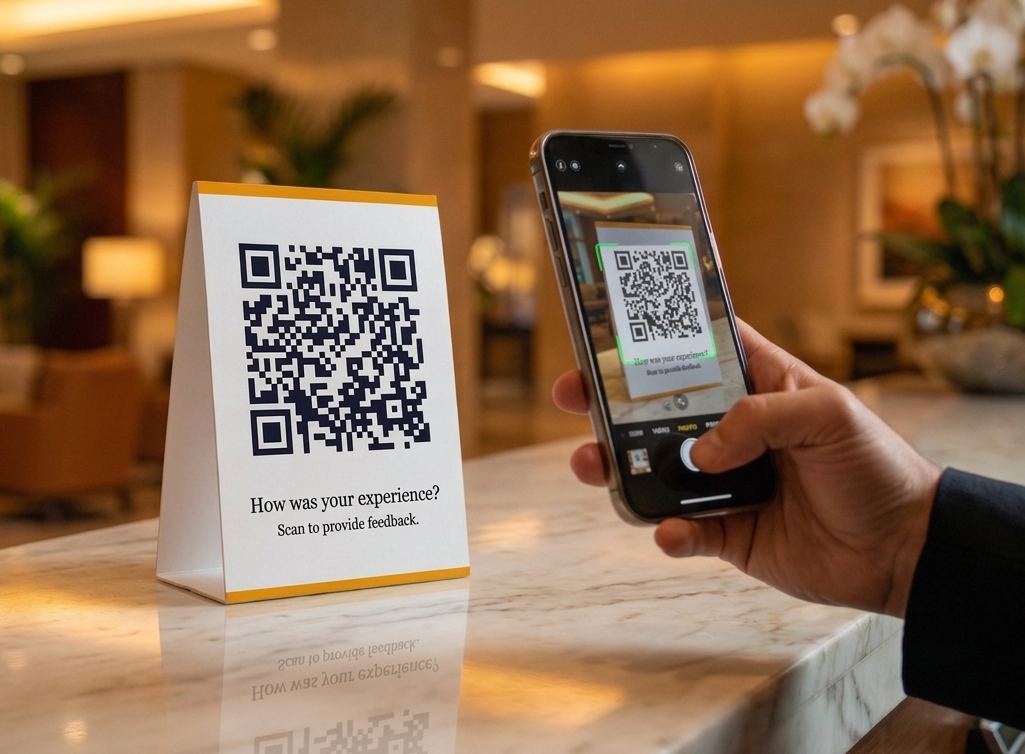
Table stands with QR codes make it easy for restaurant customers to share feedback after their meal
Table-Specific Tracking
Generate individual QR codes for each table (Table 1, Table 2, Patio 1, etc.). Track if certain areas of your restaurant get more complaints.
Scan to Review
Make it effortless for happy diners to leave Google reviews with a scan-to-review system that generates review text automatically.
Real-Time Issue Detection
Get immediate alerts when customers report negative experiences, allowing you to address problems before the customer leaves.
What Restaurants Learn from QR Code Feedback
- Service quality by section: Discover if certain servers or sections consistently get better or worse feedback
- Menu item performance: Learn which dishes customers love and which disappoint
- Timing insights: Identify if service quality drops during rush hours
- Recurring complaints: Spot patterns like "food took too long" or "server was inattentive" before they become public reviews
Instead of discovering problems weeks later through negative Google reviews, restaurants using QR code feedback systems catch and resolve issues in real-time, dramatically improving customer satisfaction and online reputation.
QR Code Feedback for Hotels
Hotels have an even more complex feedback challenge than restaurants. Guest experiences span multiple touchpoints — check-in, room quality, housekeeping, amenities, and check-out — and hotels need feedback on specific rooms and staff to maintain quality.
Guest Feedback Form in Hotel Rooms
The traditional guest feedback form in hotel properties was a paper card that guests rarely filled out. Modern hotels place QR codes in strategic locations:
- In-room QR codes: On nightstands or welcome packets, each with a unique identifier for that room
- Check-out desk: Final opportunity to collect feedback
- Amenity areas: Gym, pool, spa — track satisfaction for each facility
Room-Specific Feedback Tracking
Here's where hotel guest feedback systems become truly powerful. By assigning unique QR codes to each room (Room 101, Suite 205, etc.), hotels can:
Identify Problem Rooms
Discover if specific rooms consistently get complaints about noise, cleanliness, or maintenance issues.
Track Maintenance Needs
Get early warnings about AC problems, plumbing issues, or worn furnishings before they generate negative reviews.
Measure Renovation Impact
Compare ratings before and after room renovations to quantify improvement.
Preventing Negative Reviews Before Check-Out
The most valuable aspect of hotel guest feedback form systems with QR codes is the ability to resolve issues before guests leave. When a guest scans the QR code and reports a problem, hotel management receives an instant alert and can:
- Send staff to address the issue immediately
- Offer compensation or room upgrades
- Turn a negative experience into a positive one before it becomes a public review
This proactive approach to hotel guest feedback collection has helped hotels reduce negative reviews by up to 60% while simultaneously increasing positive Google reviews.
QR Code Feedback for Salons, Spas & Service Businesses
Service businesses like salons, spas, barbershops, and beauty service providers benefit immensely from QR code feedback systems because they can track feedback by individual service provider.
Stylist and Service Provider Tracking
Create unique QR codes for each stylist, esthetician, or massage therapist. Customers scan after their service to rate their specific provider. This allows businesses to:

QR codes in service businesses enable provider-specific feedback tracking for salons, spas, and professional services
- Identify top performers: Recognize and reward stylists who consistently receive excellent feedback
- Spot training needs: Identify providers who need additional coaching or training
- Optimize scheduling: Book high-demand stylists more efficiently based on customer satisfaction scores
- Prevent staff issues: Address interpersonal or skill problems before they result in customer churn
Point-of-Experience Feedback
The key to effective service business feedback is capturing it at the point-of-experience — right after the service is completed. QR codes on checkout receipts, mirrors, or checkout counters enable this perfectly timed feedback collection.
QR Code Feedback for E-commerce & Online Retailers
E-commerce businesses face a unique challenge: collecting feedback from customers who never visit a physical location. Traditional post-purchase email surveys have abysmal response rates (often under 2%), and by the time customers receive follow-up emails, they've moved on to other things.
QR code feedback systems transform e-commerce feedback collection by meeting customers at the moment they interact with your product — during unboxing and first use.
Product Package Inserts with QR Codes
The most effective e-commerce implementation is including QR code feedback cards inside product packaging. These small insert cards are the first thing customers see when they open their package, creating an immediate opportunity for feedback.
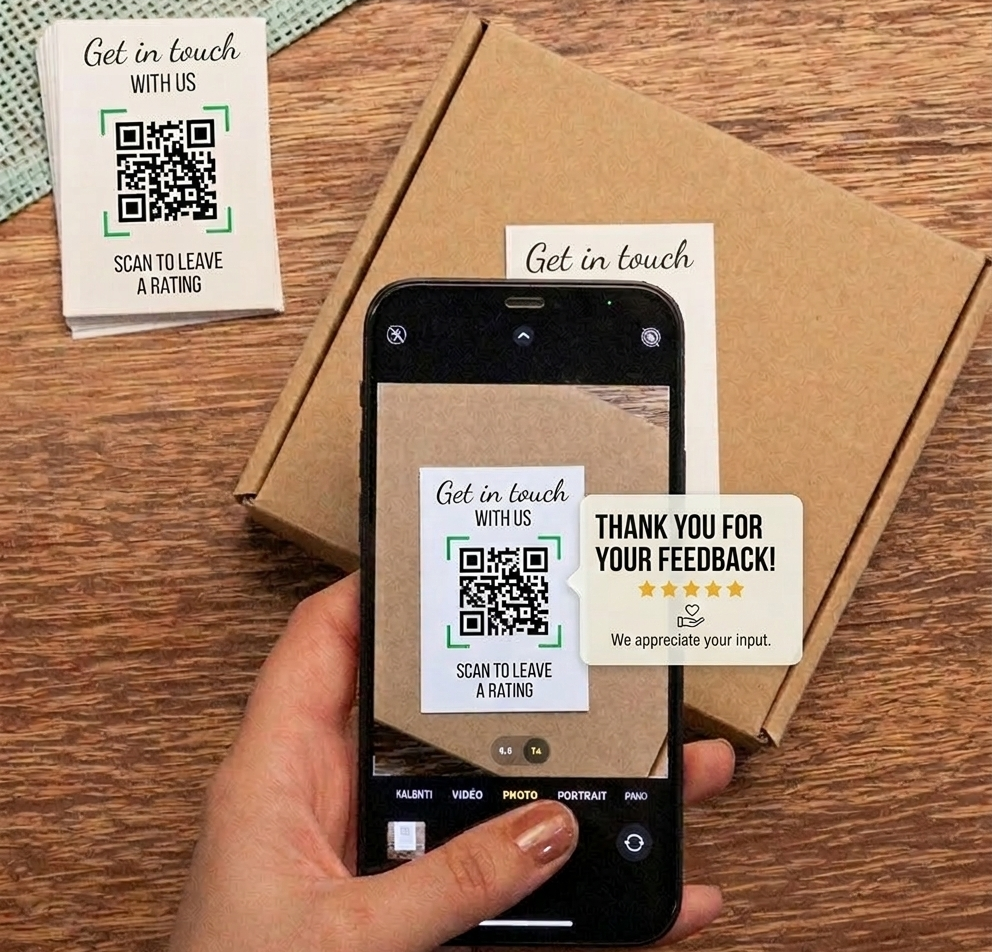
QR code feedback cards inside product packages enable instant customer feedback during the unboxing experience
Product-Specific Tracking
Generate unique QR codes for each product SKU. Discover which products consistently receive positive feedback and which generate complaints about quality, sizing, or expectations.
Catch Issues Before Returns
When customers scan and report problems immediately after receiving their order, you can proactively offer solutions, replacements, or partial refunds — preventing returns and negative reviews.
Amazon Review Generation
For products sold on Amazon or other marketplaces, guide happy customers to leave reviews on those platforms with pre-written review text based on their feedback.
What E-commerce Businesses Learn from QR Code Feedback
- Product quality issues by SKU: Identify specific products with defects, sizing problems, or quality control issues before they generate waves of returns
- Shipping and packaging problems: Learn if products arrive damaged, if packaging is inadequate, or if delivery times are problematic
- Product-market fit: Discover if product descriptions match reality and if customer expectations are being met
- Unboxing experience: Get feedback on packaging quality, presentation, and the overall first impression
- Return reason patterns: Understand why customers are unhappy before they initiate returns
Reducing Return Rates with Proactive Feedback
The most valuable aspect of e-commerce QR code feedback is the ability to prevent returns and negative reviews through early intervention. When a customer scans the QR code and reports dissatisfaction, e-commerce businesses can:
- Immediately reach out with troubleshooting help or usage tips
- Offer partial refunds without requiring returns (saving shipping costs)
- Send replacement products for defective items
- Turn negative experiences into positive ones before they become public reviews
E-commerce Success Story: Online retailers using QR code feedback systems report 30-40% reductions in return rates and 3x more product reviews by making it effortless for happy customers to share feedback and converting that feedback into marketplace reviews.
Multi-Marketplace Review Strategy
Unlike brick-and-mortar businesses that primarily focus on Google reviews, e-commerce businesses need reviews across multiple platforms:
- Amazon reviews for products sold on Amazon
- Shopify/website reviews for direct-to-consumer sales
- Trustpilot or other review sites for brand credibility
- Google reviews for overall brand reputation
Smart QR code feedback systems can route happy customers to the appropriate review platform based on where they purchased, maximizing review generation across all sales channels.
How to Collect Customer Feedback at Every Touchpoint
The strategic placement of QR codes throughout your business — whether physical locations or product packaging — creates multiple opportunities to collect customer feedback. Here are the most effective touchpoints:
Strategic QR Code Placement Locations
Table Tents & Stands
Perfect for restaurants, cafes, and bars. Customers see them during their entire visit.
Receipts & Bills
Print QR codes on receipts at the natural moment when customers are evaluating their experience.
Product Packaging & Inserts
E-commerce businesses include QR code cards in every package. Customers scan during unboxing to share feedback on specific products, preventing returns and generating marketplace reviews.
In-Room Materials
Hotels place QR codes on nightstand cards, welcome folders, or bathroom mirrors.
Checkout Counters
Retail stores and salons benefit from QR codes at the point of sale.
Service Areas
Gyms, spas, and amenity areas should have QR codes for facility-specific feedback.
QR Asset Cards for Individual Item Tracking
The most advanced implementation is using QR Asset Cards — unique QR codes assigned to individual assets like:
- Hotel Room 101, Room 102, Room 103...
- Restaurant Table 1, Table 2, Patio Section...
- E-commerce Product SKU-12345, SKU-67890 (track feedback by specific product)
- Service Provider #1, Stylist #2...
- Equipment #7, Equipment #8...
This granular tracking allows businesses to identify exactly which assets consistently perform well or poorly, enabling targeted improvements rather than guessing where problems exist. For e-commerce, this means discovering which specific products have quality issues, sizing problems, or unmet customer expectations.
QR Feedback vs. Traditional Surveys — What Works Better?
Traditional customer feedback methods — email surveys, phone calls, paper forms — suffer from low response rates, delayed feedback, and superficial responses. Let's compare:
| Factor | Traditional Surveys | QR Code Feedback |
|---|---|---|
| Response Rate | 2-5% | 15-30% |
| Timing | Days or weeks after experience | Immediate, in-the-moment |
| Feedback Quality | Vague, generic responses | Detailed, specific, actionable |
| Friction | High (open email, click link, fill form) | Minimal (scan and respond) |
| Issue Resolution | Too late to fix | Real-time alerts enable immediate resolution |
| Review Generation | Separate process | Integrated seamlessly |
The AI Advantage in QR Code Surveys
Modern qr code survey systems that use AI conversational interfaces perform even better than basic QR code forms. Instead of presenting customers with a static multiple-choice survey, AI systems:
- Ask natural follow-up questions based on customer responses
- Understand sentiment and probe deeper into negative experiences
- Generate detailed transcripts that reveal exactly what happened
- Identify patterns across hundreds of conversations to surface recurring issues
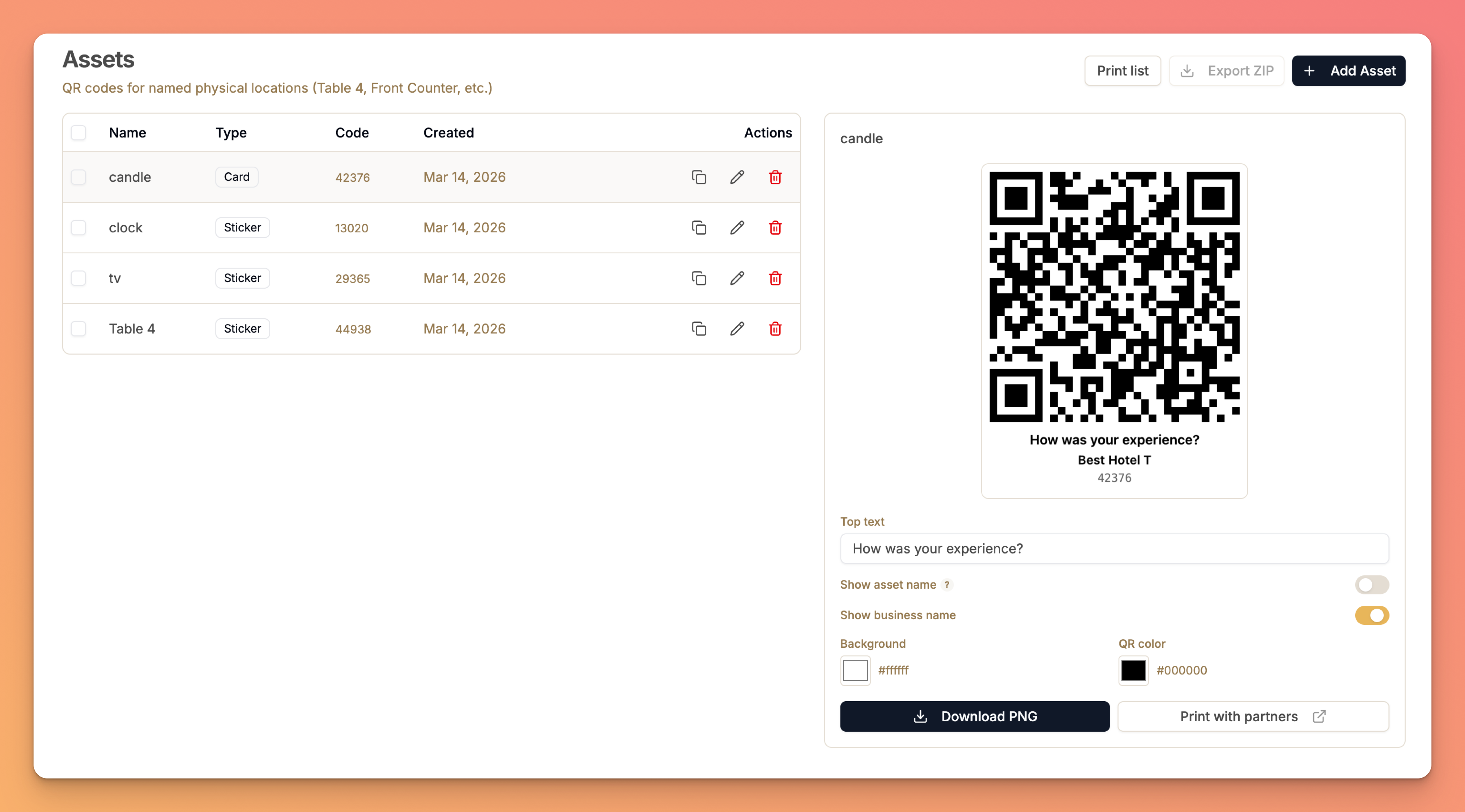
AI conversational interface that asks intelligent follow-up questions based on customer responses
This conversational approach to customer feedback collection transforms a simple rating into a rich dialogue that provides actionable insights.
See How RateResolver's AI Conversations Work
Watch how our AI chats with every customer to understand their experience, generates Google reviews for happy customers, and helps you resolve issues before they become negative reviews.
Start Free TrialBest Practices for QR Code Feedback Systems
To maximize the effectiveness of your QR code feedback implementation, follow these proven best practices:
1. Make QR Codes Visible and Accessible
- Use high-contrast designs that are easy to scan
- Place QR codes at eye level where customers naturally look
- Include simple instructions like "Scan to share your experience"
2. Brand Your Feedback Experience
- Customize the feedback interface with your logo and colors
- Use messaging that matches your brand voice
- Create a seamless experience from physical touchpoint to digital interface
3. Respond Quickly to Feedback
- Set up instant notifications for negative feedback
- Train staff to respond to issues while customers are still on-site
- Follow up with customers who report problems
4. Use Dynamic QR Codes
- Dynamic QR codes can be updated without reprinting
- Change destinations, update forms, or modify the experience as needed
- Track scan analytics to measure engagement
5. Integrate Review Generation
- Don't just collect feedback — convert happy customers into reviewers
- Make the path from positive feedback to Google review effortless
- Use AI-generated review text to remove friction
Frequently Asked Questions
How do I create a QR code for feedback?
To create a QR code for feedback, use a QR code feedback platform like RateResolver. Simply sign up, customize your feedback form with your branding, and generate a unique QR code that links to your customer feedback form. You can print this QR code on table tents, receipts, or product packaging. The best platforms allow you to create multiple QR codes for different assets (tables, rooms, products) to track feedback at a granular level.
How do I get a QR code for Google reviews?
To get a QR code for Google reviews, you need your Google Business Profile review link and a QR code generator. The smart approach is using a platform like RateResolver that first collects a rating, then only directs happy customers (4-5 stars) to Google reviews with AI-generated review text. This filters out potentially negative reviews and makes it effortless for satisfied customers to post detailed, positive reviews. Simply generate your Google review link, input it into your feedback system, and the platform creates a QR code that handles the entire workflow automatically.
How to generate a QR code for Google review?
Generate a QR code for Google reviews by following these steps: 1) Find your Google Business Profile Place ID by searching for your business, 2) Create your Google review link using your Place ID in the format: https://search.google.com/local/writereview?placeid=YOUR_PLACE_ID, 3) Use a Google review link generator or QR code generator for Google reviews to convert this link into a scannable QR code, 4) Download and print the QR code for placement at your business. For best results, use an intelligent platform that collects feedback first before directing customers to Google, ensuring only positive experiences become public reviews.
How to collect customer feedback?
Collect customer feedback effectively by placing QR codes at strategic physical touchpoints throughout your business location. The most effective locations include table stands for restaurants, in-room materials for hotels, checkout receipts for retail, and product packaging for e-commerce. Use a QR code feedback system that enables customers to scan and immediately share their experience without downloading apps or navigating complex forms. The best systems use conversational AI to ask natural follow-up questions, collecting rich, actionable feedback rather than simple star ratings. Set up real-time alerts so you can address negative feedback immediately, and integrate Google review generation so happy customers can easily share positive experiences publicly.
What is a QR code survey?
A QR code survey is a digital feedback collection method where customers scan a QR code with their smartphone camera to instantly access a survey or feedback form. Unlike traditional surveys that require typing URLs or opening emails, QR code surveys require zero friction — just point and scan. Modern QR code survey systems go beyond basic forms, using conversational AI to ask intelligent follow-up questions based on customer responses. This creates a more natural, engaging experience that yields significantly richer feedback data than static multiple-choice surveys. QR code surveys work on all smartphones, require no app downloads, and can be customized with your branding to create a seamless customer experience.
Why should businesses use QR code feedback?
Businesses should use QR code feedback because it solves the fundamental problems with traditional feedback collection: low response rates, delayed feedback, and superficial responses. QR code feedback systems capture in-the-moment customer sentiment when experiences are fresh and detailed. They require zero app downloads, work on all smartphones, and can be strategically placed at every physical touchpoint in your business. QR codes enable per-asset tracking, allowing restaurants to monitor feedback by table, hotels to track ratings by room, and retailers to collect product-specific feedback. Most importantly, QR code feedback systems give businesses the opportunity to address issues immediately — often before the customer even leaves — preventing negative online reviews and dramatically improving customer satisfaction.
What is a contactless feedback system?
A contactless feedback system allows customers to provide feedback without physical forms, staff interaction, or shared devices. QR code feedback is the most effective contactless feedback solution — customers simply scan a QR code with their personal smartphone to access the feedback interface. This approach maintains hygiene standards while still collecting valuable customer insights at every physical touchpoint. Contactless feedback systems became especially important during the pandemic, but they remain valuable because they reduce friction, respect customer privacy, and enable instant, digital feedback collection that can be immediately analyzed and acted upon. The best contactless feedback systems use AI to create conversational experiences that feel personal despite being fully automated.
How do e-commerce businesses use QR code feedback?
E-commerce businesses include QR code feedback cards inside product packaging. When customers open their order, they see a card inviting them to scan and share their experience. Each product SKU can have its own unique QR code, allowing businesses to track feedback by specific product and identify quality issues, sizing problems, or shipping damage patterns. QR code feedback helps e-commerce stores reduce return rates by catching unhappy customers early and offering solutions before they initiate returns. Happy customers can be directed to leave reviews on Amazon, Shopify, or other marketplaces where the product is sold, dramatically increasing review generation across all sales channels.
Getting Started with QR Code Feedback Systems
Implementing a QR code feedback system is one of the highest-ROI investments any business — whether brick-and-mortar or e-commerce — can make for reputation management and customer satisfaction. Here's how to get started:
Step 1: Choose Your Platform
Select a QR code feedback platform that offers:
- Conversational AI for richer feedback collection
- Google review integration with AI-generated review text (and marketplace reviews for e-commerce)
- Asset-specific tracking (QR codes for individual tables, rooms, products by SKU)
- Real-time alerts for negative feedback
- Custom branding to match your business identity
- Analytics dashboard to spot trends and patterns
Step 2: Customize Your Experience
Brand your feedback interface with your logo, colors, and messaging. Ensure the digital experience matches your physical brand.
Step 3: Generate QR Codes
Create QR codes for your business and individual assets. Use dynamic QR codes so you can update destinations without reprinting.
Step 4: Deploy Strategically
Print and place QR codes at all key touchpoints — tables, checkout counters, rooms, receipts, product packaging.
Step 5: Monitor and Respond
Set up notifications, train staff to respond to feedback, and use the insights to continuously improve your customer experience.
Transform Your Customer Feedback Today
RateResolver provides everything you need to collect instant feedback, generate more Google reviews, and protect your online reputation. AI-powered conversations, asset-specific tracking, real-time alerts, and seamless Google review integration — all in one platform.
Start your free 14-day trial — no credit card required.
Get Started FreeConclusion: The Future of Customer Feedback Is Contactless and Conversational
QR code feedback systems represent the evolution of customer feedback collection from passive (hoping customers will fill out surveys) to active (making it effortless to share experiences instantly). By combining the convenience of QR codes with the intelligence of conversational AI, modern feedback systems collect richer data, enable real-time issue resolution, and seamlessly generate positive online reviews.
For restaurants, hotels, e-commerce stores, salons, and local businesses competing in an online-review-driven economy, implementing a QR code feedback system isn't optional — it's essential for maintaining customer satisfaction and protecting your online reputation.
The businesses that thrive will be those that make it effortless for customers to share their experiences, respond quickly to feedback, and continuously improve based on real customer insights.
Ready to transform how you collect customer feedback? Start your free trial of RateResolver and see why hundreds of businesses trust our AI-powered QR code feedback system to protect and grow their online reputation.